
When an electronic design company accumulates large amounts of inventory, it can become overwhelming for engineers to go through the thousands of parts to find the one needed in a new design. Instead, they are likely to select a new part from one of the distributors that have a better search engine. This leads to an ever growing inventory: parts kept in stock and never used, a constant departure from the ideal of having a “lean” operation.
Nowadays, with everyone creating their own “agent” for just about anything, I wondered how hard it would be to create my own search engine. This article represents a day of work, proving that structured data extraction from semi-unstructured sources like datasheets has become almost a trivial problem.
I took the Gemma 3 model (12B parameters, 3-bit quantization) from Google, ran it in the llama.cpp inference framework, and fed it the datasheet for an opamp. To extract the text from the PDFs, I used the Docling Python library from IBM research. The output, generated in about four minutes on a GPU with 8 GB of memory, will be in this format for now:
"PSRR (Input offset voltage versus power supply)": {
   "min": 65,
   "typ": 100,
   "max": null,
   "unit": "dB"
 },
Let’s get started!
Obtain and build llama.cpp:
git clone https://github.com/ggerganov/llama.cpp
cd llama.cpp
cmake -B build -S . -DGGML_CUDA=ON
cmake --build build -j
Obtain the Gemma 3 model.
Start the LLM server:
llama-server -m ~/temp/gemma-3-12b-it-UD-IQ3_XXS.gguf \
   --port 8080 -c 4096 -ngl 999
Open localhost:8080 and feel free to chat with the model. How simple things
have become!
Next, we need to convert the datasheets from the PDF format into plain text that
we can feed to the model. Assuming docling is installed (install it with Pip
if not), we can define the following function to convert the documents:
import sys
from pathlib import Path
from docling.document_converter import DocumentConverter

def convert_pdf_to_markdown(pdf_file):
    pdf_path = Path(pdf_file)
    converter = DocumentConverter()
    result = converter.convert(pdf_path)
    content = result.document.export_to_markdown()
    print(content)
This yields the output in a Markdown format.
Here’s the best part: the “source code” for the agent is in plain English. Here it is in its entirety:
You are a datasheet specification extraction agent. Your
only job is to extract specifications.

OUTPUT FORMAT:
{
  "Full parameter name (short name)": {
    "min": number or null,
    "typ": number or null,
    "max": number or null,
    "unit": "string"
  }
}

EXTRACTION RULES:
- Always include both the full and short spec name in the key.
- Full name goes first, and short name in brackets: "Operating Temperature (T)"
- If a typ value is a range like "-11.5 to 14.5", split it: min=-11.5, max=14.5
- Convert scientific notation: "10 12" → 1e12
- Convert ± values into min/max fields
- Omit parameters with no numeric values (all null)
- Omit footnotes like (1) and (2)
- If no specifications exist, return: {}

CRITICAL OUTPUT RULES:
- Return ONLY valid JSON
- NO explanations
- NO descriptions
- NO phrases like "this section", "no specifications", "I will skip"
- NO text before or after the JSON
- NO markdown code blocks
- Just the raw JSON object
The insistence on pure JSON is a hack to make it stop being too chatty. There’s probably a more sophisticated way to do it, but for a first attempt it’ll do just fine.
The datasheet conversion from PDF includes lots of unnecessary text like document version information, copyright, ordering information. For now, we’d like to get just the electronic specifications. As a first approximation, assume that the information is always present in tables only.
ChatGPT assures me that the following regex magic will extract tables from a Markdown document:
import re

def get_chunks(filepath):
    """Return a list of Markdown tables as strings from a file."""
    with open(filepath, "r", encoding="utf-8") as f:
        content = f.read()

    table_pattern = re.compile(
        r"(?:^\|.*\|\s*\n)"           # Header row
        r"(?:^\|[-:\s|]+\|\s*\n)"     # Separator row
        r"(?:^\|.*\|\s*\n?)+",        # Body rows
        re.MULTILINE
    )

    tables = table_pattern.findall(content)
return [t.strip() for t in tables]We have all the pieces now: text data in small pieces, a model, the prompt to define an agent. Now just iterate over all the chunks as defined above, send them to the model together with the prompt, and observe what comes out. To automate the process from PDF to the final JSON, I used a Makefile defining the recipes for the three steps of the transformation. All of this is too straightforward to be worth including here.
For anyone interested, find the entire code presented above here.

There’s a recurring paradox in life: when forced into constraint—normally in the office—it’s easy to get a surprising amount of work done. When free—at home, with a desk full of possibilities—I do almost nothing. Probably most people have felt this: paralyzed by options, not liberated by freedom.
In the office, there’s a clear system. Hours, tasks, deadlines. None of these promise joy or meaning. You just show up, pick the thing that needs to be done, and do it. Often it’s boring, sometimes hard, sometimes fun—but mostly it’s ordinary execution. And it gets done, the meaning/joy shows up later, if it does. In other words, meaning is retrospective, not prospective.
At home, when anyone could be the architect of their own life—at least in theory—everything feels like a potential project rather than a commitment. There’s a long list of things to do someday. You start something, lose interest, start something else, lose interest there too. The pile grows. The mind feels like a full cup, overflowing, useless as a vessel since it has no volume available. I had a lot of energy running toward the possibility of things, and none toward actually doing any of them.
There are all these things to do, but when the time came, I would just scroll through random websites and stuff. Not for lack of desire but because every possibility was simultaneously “urgent” and none had any context, boundary, or commitment. I was waiting for the meaning to arrive—expecting to feel it first, and act second. A kind of dopamine-before-action loop that never materializes, because dopamine isn’t a starting signal; it’s a reward signal after progress has been made.
I recently realized this was not a motivational problem but a structural one.
The ideas.txt file, where the latest projects and ideas get stored, was
effectively a home version of what at work would be called unnecessary.txt: a
repository of work items that don’t currently need attention (see this
article for more on this approach). But
because at home all of those things are regarded as “alive”, they were
cluttering the “mental desk”, competing for attention and claiming emotional
validity. This is exactly how productivity systems fail: they mistake interest
with execution rights. You think something is alive because you wrote it down.
That creates mental load.
So I enforced a constraint.
I adapted this: Only one productive leisure project gets execution rights at a
time. The rest become cold archive—”not right now, maybe later.” They live in
ideas.txt, not in the working memory.
This is not suppression of curiosity. It’s admission control, a bit like the WIP limits (the kanban-style work in progress caps, see below) that enforce unity of purpose and prevent jamming the “system” with too many requirements.
The curious thing: once all the other activities besides the “One Hobby” became off-limits to tracking and obligation, they lost their psychological “landmine” quality. They became playful again, instead of competing for real estate in the head. Then they were constantly evaluated, compared, prioritized—a swarm of partial commitments without form or finish.
That distinction matters.
Productive Leisure is an activity that:
can be tracked for progress,
has future implications or expectations,
competes for mental slots,
produces artifacts, skill growth, or structured outcomes.
These are the things that can fill up the mind if left unconstrained.
In contrast, restorative Leisure is play without future stakes:
no tracking,
no backlog,
no scorecards,
activities done for their own sake.
Once Productive Leisure items were formally demoted to “cold archive unless active,” many of them felt like Restorative Leisure: something you might do because it’s pleasant, not something you have to do to avoid guilt or loss.
This distinction mirrors the essence of constraint in productivity: by making clear what counts and what doesn’t, you reduce the cognitive load of decision-making and let intentional action happen.
Kanban, in its original form at Toyota, was a simple, physical system for managing production flow on the factory floor using cards that each represented permission to produce or move a specific part. Rather than relying on schedules, forecasts, or manager oversight, kanban used these tangible cards to regulate when work could start and when it could move forward. The system naturally enforced limits on how much unfinished work could exist at any moment.
The key irony is that the system makes work more productive by preventing work, that is, an excess of work. Each step in the production line is governed by a small number of physical kanban cards, and a task cannot move forward unless a card is available. It recognizes that no worker or process has infinite capacity and it helps no one to pretend otherwise. Bottlenecks become visible immediately, there is no illusion of productivity or busy-work, queues cannot silently grow, and problems are forced to surface where they actually occur.
Fewer parallel tasks means less context switching, faster feedback, and higher quality, since defects were discovered close to their source. Crucially, kanban does not rely on motivation, discipline, or managerial pressure; it embedded restraint directly into the environment. The tokens made overcommitment impossible, and in doing so created the emptiness in which steady, reliable work could actually happen.
I was struck by how this aligned with a very old idea: the usefulness of emptiness:
I do my utmost to attain emptiness; I hold firmly to stillness. The myriad creatures all rise together And I watch their return. [Tao Te Ching, 16]
The way never acts yet nothing is left undone. [37]
The Master does nothing, yet he leaves nothing undone. The ordinary man is always doing things, yet many more are left to be done. [38]
The Taoists observed that a cup is useful because it is empty; a room is useful because it has space. When something gets completely full, it loses its usefulness. The same applied to the “mental desk”: when it was totally full of half-alive things, it became rigid, dead, and useless.
In this emptiness—not the absence of goals, but the absence of competing commitments—things can actually happen. You don’t wait for meaning; you let meaning emerge from action.
“The Way does nothing, yet leaves nothing undone.” Action arises unforced when the system isn’t cluttered with demands, comparisons, and anticipation.
The system distilled down to a simple invariant:
Only one productive leisure activity is alive in the present.
Everything else is archived.
Restorative activities are permissionless.
Progress, not aspiration, drives meaning.
In other words, interest does not grant execution rights. Execution rights must be scarce, just like kanban tokens. When they are, things get done; when they’re abundant, nothing happens.
In this system, willpower or motivation became almost irrelevant. When the mind is freed from the need to do “everything”, the intention can take over. This kind of intentional action, in my experience, only works when there’s very few intentions to compete with each other.
Emptiness isn’t the absence of desires. It’s the absence of conflicting claims on your attention. Start there, and you can actually practice something.

This is Part 6 in the series: Linux on STM32MP135. See other articles.
This is a record of steps I took to successfully get Linux past the early boot stage on my custom board using the STM32MP135 SoC. (Schematics, PCB design files, and code available in this repository.) The write-up is in approximate chronological order, written as I go through the debugging steps.
I had previously put together a simple bare-metal program that runs on the STM32MP135 evaluation board and just blinks the LED. To work on the custom board, I needed only to remove anything to do with the STPMIC1 and LSE clock (the low-speed external 32.768 kHz clock), since I did not place these parts on my board. The resulting code is pretty simple modulo complexity inherited from the ST drivers.
To download the code, I talked directly to the ROM bootloader on the SoC. See this article for details.
Again, I had previously put together a simple program to test the DDR on the evaluation board. It fills the memory entirely with pseudorandom bits (PRBS-31), and then reads it out, checking that the data matches.
For the custom board, the program had to be modified similarly as with blink (remove STPMIC1, LSE clock) and then it ran. (Click for code.)
There was an issue: all data read back was wrong and subtly corrupted. I double checked the wiring, DDR parameter configuration (I use the same DDR as the eval board, so what could it be!?), the code—only to realize the board was not getting enough current on the 1.35V power supply. With more power, everything just worked!
For JTAG loading it appears to be essential to select “Development boot” (also
called “Engineering boot”) by selecting the boot pins in the 100 setting. The
datasheet says this mode is used “Used to get debug access without boot from
flash memory”.
There is also a footnote that says that the core is “in infinite loop toggling
PA13”, but I did not observe the toggling in the “dev boot” mode, even though it
is of course present (but not documented) in the normal UART boot mode (pins =
000).
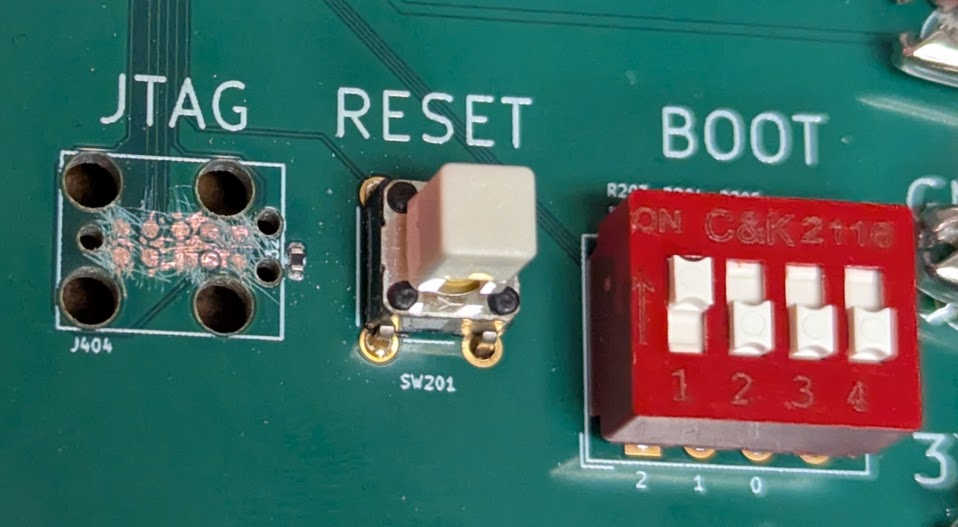
Unfortunately I covered the J-Link connector with solder mask. After trying to carefully scratch it off using a sewing needle, the connection appears to be intermittent. Sometimes J-Link was able to download the DDR test program to the SYSRAM, but most of the time it couldn’t. Probably it would work just fine if it wasn’t for the soldermask covering. I wish I had just used a normal pin-header connector rather than the J-Link needle adapter. So, I’ll have to use UART boot mode for now, and hope that I can get the (much faster) USB mode to work.
Note: read the full SD card story here.
On the STM32MP135 evaluation board, an SDMMC example reliably reads a program
from an SD card into DDR and executes it, but porting the same code to a custom
board exposed a failure during SD initialization. Although command-level
communication succeeded—CMD0, CMD8, CMD55, and ACMD41 all completed normally and
the card identified as SDHC—the sequence consistently failed later in
SD_SendSDStatus with SDMMC_FLAG_DTIMEOUT. Hardware checks showed that SD
card power, SDMMC I/O domain voltages, and signal levels all matched the
evaluation board, with clean 3.3 V logic and a low clock rate of about 1.56 MHz.
The decisive difference turned out to be signal pull-ups: the evaluation board
routes SD signals through an ESD device with built-in pull-ups, whereas the
custom board did not. Enabling internal pull-ups on the SD data lines eliminated
the data timeout and allowed SD reads to proceed, confirming that missing
pull-ups were responsible for the initialization failure.
However, once SD transfers succeeded, the data read from the card appeared corrupted in DDR: roughly every other byte was intermittently wrong, always off by exactly two, independent of bus width, clock edge, power supply, or signal integrity. The critical observation was that data read into a static buffer in SYSRAM was always correct, while corruption appeared only after copying that data into DDR using byte-wise writes such as memcpy. When DDR was written using explicit, 32-bit aligned word accesses, the corruption disappeared entirely. Ensuring that all DDR writes are word-sized and properly aligned provided a full workaround for the issue and restored correct, reproducible SD card operation on the Rev A custom board. (The issue is likely due to a mask/strobe swap in the DDR wiring; see this for details.)
Note: read the full USB story here.
Getting USB working on a custom STM32MP135 board involved a few key hardware and software steps. First, I enabled the USBHS power switch by adding a current-limit resistor so the PHY would receive power. On the board, I removed the permanent 1.5 kΩ pullup on the D+ line to allow proper High-Speed enumeration. I also ensured JTAG worked reliably by booting in engineering debug mode and verifying the vector table took interrupts in ARM mode.
On the software side, I disabled VBUS sensing in the HAL PCD initialization to
match the externally powered board, configured the Rx/Tx FIFOs, and made sure
all required USB interrupts were correctly handled. For the USB Device stack, I
added the necessary callbacks in usbd_conf.c and applied volatile casts to
ensure 32-bit accesses to SYSRAM were aligned, avoiding Data Aborts.
Finally, I verified proper memory alignment for DDR writes to ensure file transfers worked without byte shuffling, and confirmed enumeration and data transfers at High-Speed using a good USB cable and port. After these steps, the board enumerated correctly as an MSC device, and read/write operations functioned reliably.
Note: read the full TrustZone story here.
The STM32MP135 integrates the Arm TrustZone extension which partitions the
system into two isolated security domains, the secure and non-secure worlds,
depending on the state of the NS bit in the SCR register. Before the bit is
flipped, we need to unsecure many parts of the SoC (DDR, DMA masters, etc).
Since Linux is just another program, why not try and run it, now that we have disabled most secure-world hindrances? One thing to keep in mind is to respect the link address:
buildroot]> readelf -h output/build/linux-custom/vmlinux | grep Entry
  Entry point address:               0xc0008000
Let’s copy the binary instructions from the ELF file into something we can load into memory:
arm-none-eabi-objcopy -O binary \
    output/build/linux-custom/vmlinux \
    output/images/vmlinux.bin
Now we place the binary file in the same SD card image as the bootloader:
$ python3 scripts/sdimage.py build/sdcard.img build/main.stm32 build/vmlinux.bin

File                      LBA      Size       Blocks
-------------------------------------------------------
main.stm32                128      100352     197
vmlinux.bin               324      19111936   37329
Load the ~40,000 blocks from logical block address (LBA) 324 into DDR to
location 0xC0008000, and jump to it. If we follow along with the debug probe,
we see that the kernel begins executing in arch/arm/kernel/head.S and gets
stuck when it realizes that we did not pass it the correct boot parameters.
Let’s start with the default DTB and decompile it into the DTS:
[buildroot]> dtc -I dtb -O dts -@ \
   output/build/linux-custom/arch/arm/boot/dts/stm32mp135f-dk.dtb > \
   ~/temp/build/min.dts
Now remove as much of the unnecessary peripherals from the device tree and compile back into a DTB:
dtc -I dts -O dtb min.dts > min.dtbNext, we need to include this DTB in the SD card image:
$ python3 scripts/sdimage.py build/sdcard.img build/main.stm32 \
    build/vmlinux.bin build/min.dtb

File                      LBA      Size       Blocks
-------------------------------------------------------
main.stm32                128      100352     197
vmlinux.bin               324      19111936   37329
min.dtb                   37652    53248      105
Write the new image to the SD card, and boot the bootloader, and copy the kernel and the DTB to DDR:
> l 40000 324 0xc0008000
Copying 40000 blocks from LBA 324 to DDR addr 0xC0008000 ...
> l 105 37652 0xc2008000
Copying 105 blocks from LBA 37652 to DDR addr 0xC2008000 ...
> p 256 0xc2008000
0x00000000 : d0 0d fe ed  00 00 ce 12  00 00 00 38  00 00 bc c4  ...........8....
0x00000010 : 00 00 00 28  00 00 00 11  00 00 00 10  00 00 00 00  ...(............
0x00000020 : 00 00 11 4e  00 00 bc 8c  00 00 00 00  00 00 00 00  ...N............
0x00000030 : 00 00 00 00  00 00 00 00  00 00 00 01  00 00 00 00  ................
0x00000040 : 00 00 00 03  00 00 00 04  00 00 00 00  00 00 00 01  ................
0x00000050 : 00 00 00 03  00 00 00 04  00 00 00 0f  00 00 00 01  ................
0x00000060 : 00 00 00 03  00 00 00 32  00 00 00 1b  53 54 4d 69  .......2....STMi
0x00000070 : 63 72 6f 65  6c 65 63 74  72 6f 6e 69  63 73 20 53  croelectronics S
We can match the print against the DTB hexdump to verify that it’s been written
correctly (note the “d00dfeed” at the start of the DTB). Then issue the j or
jump instruction, and follow along with the debugger:
gdb)
69         push  {r4} // CPSR after return
(gdb) del
(gdb) si
sm_smc_entry () at src/handoff.S:70
70         push  {r3} // PC after return
(gdb)
sm_smc_entry () at src/handoff.S:71
71         rfefd sp
(gdb)
0xc0008000 in ?? ()
(gdb) file build/vmlinux
Reading symbols from build/vmlinux...
(gdb) si
__hyp_stub_install () at arch/arm/kernel/hyp-stub.S:73
73      arch/arm/kernel/hyp-stub.S: No such file or directory.
(gdb) directory build/linux-custom
Source directories searched: build/linux-custom;$cdir;$cwd
(gdb) si
0xc01149a4      73              store_primary_cpu_mode  r4, r5
Above we see the last three instructions from the bootloader, and then we need
to switch GDB to the Linux kernel executable, and provide it the source code
directory. Then, we see one of the first instructions from the kernel being
executed, on line 73 of hyp-stub.S.
Step instruction (si) a couple times until we reach the branch to
__vet_atags. That routine is responsible to determine the validity of the r2
pointer that the bootloader is supposed to point to where we copied the DTB in
the memory. Let’s see what happens:
__vet_atags () at arch/arm/kernel/head-common.S:44
44              tst     r2, #0x3                        @ aligned?
45              bne     1f
47              ldr     r5, [r2, #0]
49              ldr     r6, =OF_DT_MAGIC                @ is it a DTB?
50              cmp     r5, r6
51              beq     2f
61      2:      ret     lr                              @ atag/dtb pointer is ok
Evidently the DTB pointer is good! Now we return back to the startup code and
proceed with enabling MMU, clearing memory, etc. I got tired of single-stepping
through memset and hit continue, and was amazed to find the following on the
serial monitor:
[    0.000000] Booting Linux on physical CPU 0x0
[    0.000000] Linux version 6.1.28 (jk@SRS1720) (arm-buildroot-linux-uclibcgnueabihf-gcc.br_real (Buildroot 2024.11-202-g3645e3b781-dirty) 13.3.0, GNU ld (GNU Binutils) 2.42) #1 SMP PREEMPT Thu Dec 18 17:02:40 PST 2025
[    0.000000] CPU: ARMv7 Processor [410fc075] revision 5 (ARMv7), cr=10c5387d
[    0.000000] CPU: div instructions available: patching division code
[    0.000000] CPU: PIPT / VIPT nonaliasing data cache, VIPT aliasing instruction cache
[    0.000000] OF: fdt: Machine model: STMicroelectronics STM32MP135F-DK Discovery Board
[    0.000000] Memory policy: Data cache writealloc
[    0.000000] cma: Reserved 64 MiB at 0xdc000000
[    0.000000] Zone ranges:
[    0.000000]   Normal   [mem 0x00000000c0000000-0x00000000dfffffff]
[    0.000000]   HighMem  empty
[    0.000000] Movable zone start for each node
[    0.000000] Early memory node ranges
[    0.000000]   node   0: [mem 0x00000000c0000000-0x00000000dfffffff]
[    0.000000] Initmem setup node 0 [mem 0x00000000c0000000-0x00000000dfffffff]
In other words: IT WORKS!!!
There’s an important step that had to take place before the “blink” example could run on the custom board: let go of the sheer excitement. Having worked on or with some kind of a Linux system for perhaps two decades, it was an almost surreal, mystical feeling to hold in my hands a board that I designed myself that is supposed to run the operating system. It’s what makes engineering a rewarding experience, but the mental jitter of it can also interfere with getting things done. After all, this is just routine work!

The STM32MP135 integrates the Arm TrustZone extension which partitions the
system into two isolated security domains, the secure and non-secure worlds,
depending on the state of the NS bit. On reset, it executes in the secure
world (NS=0), but in normal operation, we want NS=1.
In this article, we explain how to execute the world transitions in a bare-metal environment. See this article to learn how to do it in the context of Arm Trusted Firmware (TF-A) and Linux.
The NS bit is only supposed to be flipped in the Secure Monitor handler,
invoked with the smc instruction. Thus a minimum handler might look as follows
(assumes the return address is passed in via r3):
.align 2
sm_smc_entry:
   mrc p15, 0, r0, c1, c1, 0 // read SCR
   orr r0, r0, #SCR_NS
   mcr p15, 0, r0, c1, c1, 0 // write SCR
   mov r0, #0

   mov r4, #(CPSR_MODE_SVC | CPSR_I | CPSR_F)
   push  {r4} // CPSR after return
   push  {r3} // PC after return
   rfefd sp
We see that the NS bit lives in the SCR register, and that there is a
special syntax to access that register. To exit from the SMC handler, we push
the desired exception state (SVC mode with IRQ and FIQ disabled) on the stack
together with the return address, and then exit with rfefd sp.
Before we can call smc, we should create the exception table. If the SMC is
the only exception we care about, a minimal table might look as follows:
.align 5
sm_vect_table:
   b .            // Reset
   b .            // Undefined instruction
   b sm_smc_entry // Secure monitor call
   b .            // Prefetch abort
   b .            // Data abort
   b .            // Reserved
   b .            // IRQ
   b .            // FIQ
Then, sometime before calling smc, install it in the MVBAR register as
follows:
ldr r0, =sm_vect_table
mcr p15, 0, r0, c12, c0, 1 // MVBARThe system and peripherals must be set up with access allowed from the
non-secure world before we flip the NS bit, otherwise the system will just
freeze. Here’s a list of things that must be unsecured before the flip:
DDR unsecured via the TZC-400 firewall
GIC distributor and CPU interface
ETZPC = Embedded TrustZone Protection Controller
Clock and reset control (RCC)
Pin controller / all GPIO banks
In the following sections, we will examine these one by one, showing how to unsecure then and how to verify they have been unsecured.
Let’s configure the TZC to allow DDR Region0 R/W non-secure access for all
IDs. While we can use the TZC to partition the RAM into several regions, we will
use Region0 only which is always enabled. (The region implicitly covers the
entire address space.)
TZC->GATE_KEEPER = 0;
TZC->REG_ID_ACCESSO = 0xFFFFFFFF;
TZC->REG_ATTRIBUTESO = 0xC0000001;
TZC->GATE_KEEPER |= 1U;
First, the “gate keeper” is disabled so that we can modify the configuration. Then, we set the access bits to all ones, so that that each NSAID gets both write and read permission. Next, we set the attributes so that secure global write and read are enabled, and the filter is enabled for the region. Finally, we “close” the gate keeper so that the configuration is active.
To verify that the configuration worked, we print out all the fields from the
TZC struct defined in the CMSIS Device Peripheral Access Layer Header File
(stm32mp135fxx_ca7.h):
[TZC dump] begin
  BUILD_CONFIG     = 0x00001F08
  ACTION           = 0x00000000
  GATE_KEEPER      = 0x00010001
  SPECULATION_CTRL = 0x00000000
  REG_BASE_LOWO    = 0x00000000
  REG_BASE_HIGHO   = 0x00000000
  REG_TOP_LOWO     = 0xFFFFFFFF
  REG_TOP_HIGHO    = 0x00000000
  REG_ATTRIBUTESO  = 0xC0000001
  REG_ID_ACCESSO   = 0xFFFFFFFF
[TZC dump] end
Of course, we will not be able to verify that the configuration actually works till we unsecure everything else on the list. Then, we will switch the CPU to nonsecure world and verify that read and write from DDR succeeds.
The Generic Interrupt Controller is split into two parts: the Distributor (GICD) takes care of the global IRQ configuration, while the CPU interface (GICC) does the per-CPU IRQ delivery. In TrustZone, there are two interrupt groups:
Group 0 corresponds to the Secure world
Group 1 corresponds to the Non-Secure world
Now we go step by step, enabling non-secure access to/from interrupts. First we configure the interrupts themselves as non-secure:
Allow both Group 0 and 1 interrupts to be forwarded from the GICD to the CPU
interfaces. The GICD control register (GICD_CTLR) is included in the CMSIS
file core_ca.h in the GICDistributor_Type struct:
GICDistributor->CTLR = 0x03U;Just before switching to non-secure world, we will disable all interrupts, mark them as non-pending, and move to Group 1 (non-secure):
const int num_reg = 5;
for (uint32_t n = 0; n <= num_reg; n++) {
  GICDistributor->ICENABLER[n] = 0xffffffff;
  GICDistributor->ICPENDR[n]   = 0xffffffff;
  GICDistributor->IGROUPR[n]   = 0xffffffff;
}In the CPU interface control register, enable Group 1 signaling:
GICInterface->CTLR |= 0x03U;Priority masking: allow all priority levels to pass through:
GICInterface->PMR = 0xFFU;Now we can dump all the GICC registers after handoff:
[GICC dump] begin
  CTLR    = 0x00000003
  PMR     = 0x000000F8
  BPR     = 0x00000002
  IAR     = 0x000003FF
  EOIR    = 0x00000000
  RPR     = 0x000000FF
  HPPIR   = 0x000003FF
  ABPR    = 0x00000003
  AIAR    = 0x000003FF
  AEOIR   = 0x00000000
  AHPPIR  = 0x000003FF
  STATUSR = 0x00000000
  APR[0]   = 0x00000000
  APR[1]   = 0x00000000
  APR[2]   = 0x00000000
  APR[3]   = 0x00000000
  NSAPR[0] = 0x00000000
  NSAPR[1] = 0x00000000
  NSAPR[2] = 0x00000000
  NSAPR[3] = 0x00000000
  IIDR    = 0x0102143B
  DIR     = 0x00000000
[GICC dump] end
This means:
CTLR enables Group 0 and 1 interrupts
PMR sets PRIORITY[4:0] = 0b11111, which allows all non-secure interrupts
to be signaled
BPR controls how the 8-bit interrupt priority field is split into a group
priority field
IAR shows CPUID = 0, and INTERRUPT_ID = 1023, which indicates a
“Spurious interrupt ID” (no pending interrupt at the CPU interface)
EOIR: CPUID = 0, end-of-interrupt ID = 0, i.e. no interrupt being
completed
RPR: PRIORITY[4:0] = 0b11111, current running priority on the CPU
interface indicates no active interrupt
Now we open access to all peripherals protected by ETZPC. Luckily the ST HAL includes a function to open the entire ETZPC to non-secure access:
__HAL_RCC_ETZPC_CLK_ENABLE();

// unsecure SYSRAM
LL_ETZPC_SetSecureSysRamSize(ETZPC, 0);

// unsecure peripherals
LL_ETZPC_Set_All_PeriphProtection(ETZPC,
     LL_ETZPC_PERIPH_PROTECTION_READ_WRITE_NONSECURE);
Let’s print out the ETZPC registers after running this:
[ETZPC dump] begin
  TZMA0_SIZE       = 0x8000000D
  TZMA1_SIZE       = 0x00000000
  DECPROT0         = 0xFFFFFFFF
  DECPROT1         = 0xFFFFFFFF
  DECPROT2         = 0xFFFFFFFF
  DECPROT3         = 0xFFFFFFFF
  DECPROT4         = 0x00000000
  DECPROT5         = 0x00000000
  DECPROT_LOCK0    = 0x00000000
  DECPROT_LOCK1    = 0x00000000
  DECPROT_LOCK2    = 0x00000000
  HWCFGR           = 0x00004002
  IP_VER           = 0x00000020
  ID               = 0x00100061
  SID              = 0xA3C5DD01
[ETZPC dump] end
This means that SYSRAM and ETZPC are fully non-secure.
Through the RCC secure configuration register (RCC_SECCFGR), we may configure
various clocks to be either secure or non-secure. Easy enough to unsecure:
RCC->SECCFGR = 0x00000000;Likewise, after enabling the GPIOs, we need to allow non-secure access to them:
GPIOA->SECCFGR = 0x00000000;
GPIOB->SECCFGR = 0x00000000;
GPIOC->SECCFGR = 0x00000000;
GPIOD->SECCFGR = 0x00000000;
GPIOE->SECCFGR = 0x00000000;
GPIOF->SECCFGR = 0x00000000;
GPIOG->SECCFGR = 0x00000000;
GPIOH->SECCFGR = 0x00000000;With the steps above done, a program will run in the non-secure world (NS=1).
However, most of the diagnostics to get there will probe secure-only registers,
such as those used by the TZC, which will result in an immediate undefined
instruction or similar abort.
In other words, in non-secure world, you are limited to non-secure things!

This article presents my step-by-step debug process for getting the SD card to work reliably on my custom board integrating the STM32MP135.
For the evaluation board, I prepared a simple example that reads a program (blink) from SD card to DDR, and passes control to the program. The LED blinks, everything is fine.
On the custom board, I simplified the example so it just tests that DDR and SD
card can be written to and read from. The SD initialization fails as follows.
In file stm32mp13xx_hal_sd.c, the function HAL_SD_Init calls
HAL_SD_GetCardStatus which calls SD_SendSDStatus. There, the error flag
SDMMC_FLAG_DTIMEOUT is detected, i.e. timeout when trying to get data.
The custom board connections from MCU to SD card pins are as follows:
PC10/SDMMC1_D2 (B13) → 1 DAT2
PC11/SDMMC1_D3 (C14) → 2 DAT3/CD
PD2/SDMMC1_CMD (A15) → 3 CMD with 10k pullup to +3.3V
+3.3V → 4 VDD
PC12/SDMMC1_CK (B15) → 5 CLK
GND → 6 VSS
PC8/SDMMC_D0 (D14) → 7 DAT0
PC9/SDMMC_D1 (A16) → 8 DAT1
PI7 (U16) uSD_DETECT → 9 DET_B with 100K pullup to +3.3V
(nc) → 10 DET_A
Since the failure happens soon after switching the card into 1.8V mode, I need
to verify the voltages. On the evaluation board, VDD_SD is 3.3V on boot, and
when the SD program is running, it lowers it to 2.9V. I modified the code to
leave it at 3.3V, and it worked also: the code read data from SD card correctly.
On my custom board, VDD_SD is tied to 3.3V directly. (SD cards should accept
abything from 2.7V to 3.6V.) Thus, the SD card voltage should be okay.
The other voltage to check is the one powering the SoC domain for the SDMMC
controller. The eval board shows that both VDDSD1 and VDDSD2 are tied to
VDD—the same VDD as the rest of the SoC. We can measure that easily via
CN14 pin 13, and it measures 3.3V. On the custom board, these are tied to 3.3V
directly.
On the eval board, I looked at the SDMMC1_CK line (about 1.56 MHz),
SDMMC1_CMD, and the data lines with a scope probe and I saw 3V logic signals,
so it does not seem that 1.8V logic is used.
Adding lots of print statements to SD_PowerON, we get the following when
running on the custom board:
CMD0: Go Idle State...
CMD0 result = 0x00000000
CMD8: Send Interface Condition...
CMD8 result = 0x00000000
CMD8 OK -> CardVersion = V2.x
CMD55: APP_CMD (arg=0)
CMD55 result = 0x00000000
ACMD41 loop...
Loop 0
  CMD55...
  CMD55 result = 0x00000000
  ACMD41...
  ACMD41 result = 0x00000000
  R3 Response = 0x41FF8000
  ValidVoltage = 0
Loop 1
  CMD55...
  CMD55 result = 0x00000000
  ACMD41...
  ACMD41 result = 0x00000000
  R3 Response = 0xC1FF8000
  ValidVoltage = 1
ACMD41 success: OCR=0xC1FF8000
Card reports High Capacity (SDHC/SDXC)
SD_PowerON: SUCCESS
Followed by the same HAL_SD_ERROR_DATA_TIMEOUT error from SD_SendSDStatus.
Let’s instrument the latter function with prints also. Here’s what we get:
--- SD_SendSDStatus BEGIN ---
Initial RESP1 = 0x00000900
CMD16: Set Block Length = 64...
CMD16 result = 0x00000000
CMD55: APP_CMD (arg=RCA<<16) = 0xAAAA0000
CMD55 result = 0x00000000
Configuring DPSM: len=64, block=64B
ACMD13: Send SD Status...
ACMD13 result = 0x00000000
Waiting for data...
ERROR: SDMMC_FLAG_DTIMEOUT detected!The SD card initialization was inherited from the evaluation board, where
all the signals are passed through the EMIF06-MSD02N16 ESD protection chip,
which also features built-in pullups.
In HAL_SD_MspInit, we can enable internal pullups on the data lines going to
the SD card. In that case, we get the following printout from the instrumented
version of SD_SendSDStatus:
--- SD_SendSDStatus BEGIN ---
Initial RESP1 = 0x00000900
CMD16: Set Block Length = 64...
CMD16 result = 0x00000000
CMD55: APP_CMD (arg=RCA<<16) = 0xAAAA0000
CMD55 result = 0x00000000
Configuring DPSM: len=64, block=64B
ACMD13: Send SD Status...
ACMD13 result = 0x00000000
Waiting for data...
RXFIFOHF set — reading 8 words...
  FIFO -> 0x00000000
  FIFO -> 0x00000004
  FIFO -> 0x00900004
  FIFO -> 0x001A050F
  FIFO -> 0x00000000
  FIFO -> 0x00000100
  FIFO -> 0x00000000
  FIFO -> 0x00000000
RXFIFOHF set — reading 8 words...
  FIFO -> 0x00000000
  FIFO -> 0x00000000
  FIFO -> 0x00000000
  FIFO -> 0x00000000
  FIFO -> 0x00000000
  FIFO -> 0x00000000
  FIFO -> 0x00000000
  FIFO -> 0x00000000
Data-end flag set, reading remaining FIFO...
Clearing static DATA flags
--- SD_SendSDStatus SUCCESS ---
After that, reading from the SD card was possible—but about half of the bytes read were slightly corrupted.
Suspecting that there is something wrong with the 4-bit data transfers, I
switched to SDMMC_BUS_WIDE_1B and confirmed with a scope probe that there is
no data on DAT1,2,3, only on DAT0. But data corruption is still there. The clock
speed is only about 1.56 MHz, which seems to rule out signal integrity issues.
I tried a different power supply for the 3.3V supply, and still the same issue. I added 330uF capacitors on all three power rails (1.25V, 1.35V, 3.3V, althought 1.25V and 1.35V are connected together), and still no improvement. (The PCB already has a 10U capacitor next to the SD card VDD pin.)
Changing the ClockEdge of the SDHandle.Init does not fix it. Nor did setting
PIO_Init_Structure.Speed to GPIO_SPEED_FREQ_VERY_HIGH.
Interestingly the corruption affects only every other byte, and if it is corrupted, it’s always just off by 2 (i.e., only bit number 1 is affected).
Adding the external 3.3V 10k pullup on DAT0 (when running in SDMMC_BUS_WIDE_1B
mode) did not fix the corruption either. At any rate, scope traces show very
clean data and clock waveforms (as is to be expected at such a low frequency).
The test function used HAL_SD_ReadBlocks to write directly into DRAM. If
instead I wrote to a static buffer in SYSRAM, it works just fine.
So reading data from the SD card into a static buffer worked perfectly, but copying that data into DRAM using a byte-wise method like memcpy caused intermittent corruption. Only every other byte was sometimes wrong, always off by exactly 2, and the pattern varied with each read. This behavior was not reproducible when filling DRAM directly with aligned 32-bit word writes, which always produced correct data.
The root cause is that the DDR wiring swapped upper and lower data bytes in a way that only causes problems with non-32-bit data access. (The debugging process that led to that insight is explained in a future article.) The SD read itself was not at fault; the static buffer contained the correct bytes.
The workaround was to copy the SD block into DRAM using explicit 32-bit aligned word writes, constructing each word from four bytes of the static buffer. This ensures all writes are properly aligned and word-sized, eliminating the intermittent errors and producing fully correct, reproducible data in DRAM.